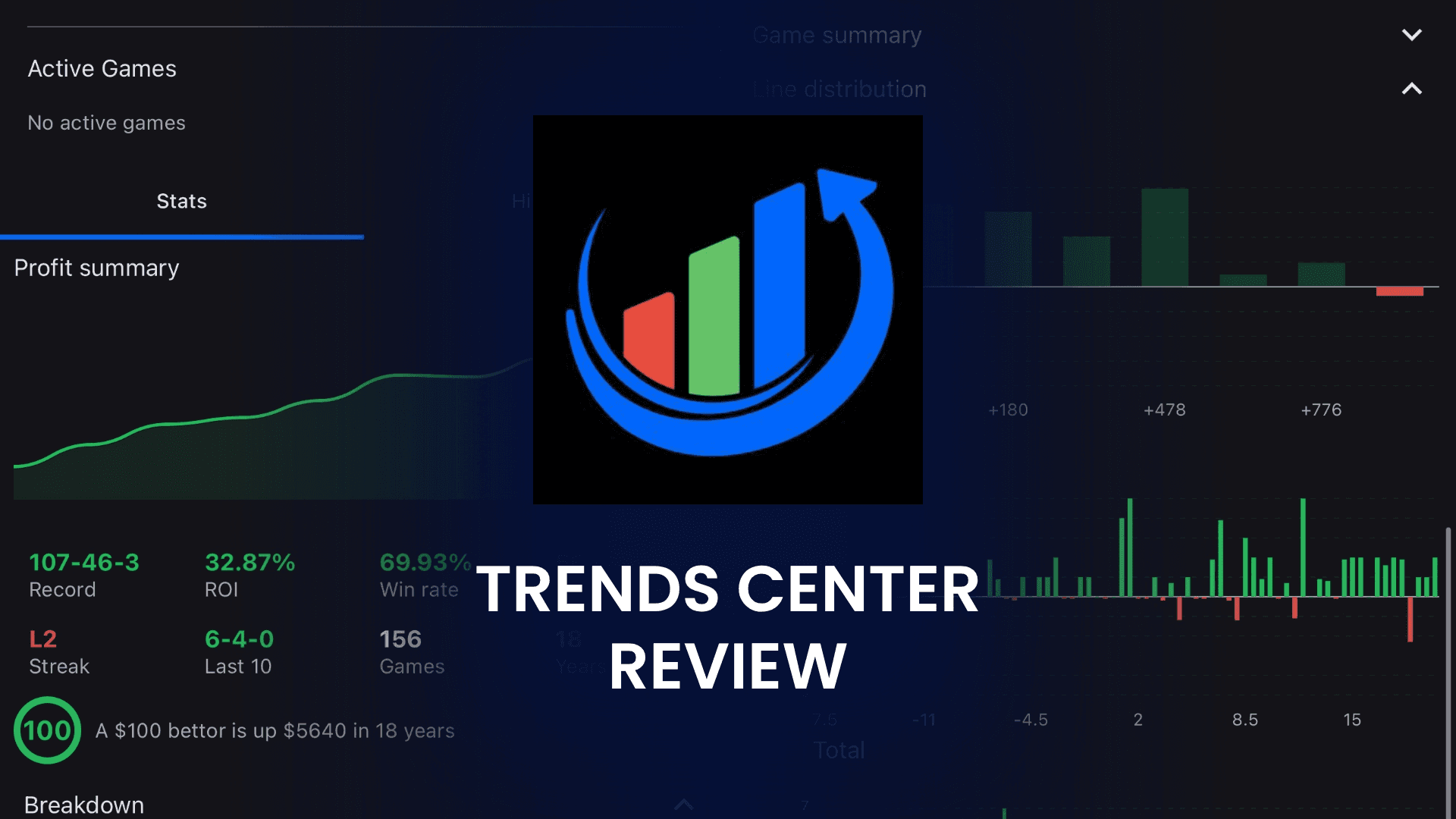
TrendsCenter Review for October 2026
Road favorites coming off a five-game losing streak. Home dogs in divisional games after a bye. Every bettor has heard a trend like that quoted with a confident win rate and no sample size attached. TrendsCenter is built for the bettor who would rather check those numbers personally than take someone's word for it, and then go find the angles nobody is quoting yet.
When I spent a week running TrendsCenter's custom filters across NFL and NBA slates, the app earned its keep as a research layer, not a picks service. You stack situation, line range, rest, and matchup conditions into one system, back test it against 30-plus years of data without writing a query, then save it and get pinged when tonight's games match. If you would rather type a question than work the filter menus, TrendyBot does the same job in plain language.
The catch is that trends are easy to abuse. Slice the data enough ways and you will always find a pattern, whether or not it means anything. TrendsCenter works best when a trend is one input you check against the current price, not a reason to bet on its own. Tail a system blindly after the market has already priced it in, and it will cost you. You can test that workflow before paying anything: the free tier covers basic back tests, Premium opens with a 3-day trial at $27.99 per month, and code BETSMART takes 15% off when you download TrendsCenter.
What Is TrendsCenter?
TrendsCenter is a mobile betting trends app that lets you build custom systems, back test situational angles across more than 30 years of historical data, and get notified when saved trends match active games. It covers NFL, NBA, MLB, NHL, NCAAF, and NCAAB, and runs on iPhone, iPad, Mac, and Android.
The app is published by Trends Center LLC and distributed through the Apple App Store and Google Play. Browsing trends and running back tests are free at a basic level, while Premium runs $27.99 per month or $199.99 per year and unlocks unlimited back tests, verified systems, and TrendyBot. It focuses on one lane, trend and system research, rather than bundling an EV scanner or bet tracker alongside it.
How to Sign Up at TrendsCenter
TrendsCenter used to run a web platform, but the team has moved entirely to mobile and desktop apps distributed through the Apple App Store and Google Play. Signing up takes a couple of minutes and happens inside the app itself. TrendsCenter runs most smoothly on iPhone and on Mac, where you can download and use the app natively from the App Store.
Open the Apple App Store or Google Play and search "TrendsCenter"
Download and install the app on iPhone, iPad, Mac, or Android
Create an account with your email or sign in through Apple or Google
Complete the in-app onboarding tutorial that walks you through trend filters, systems, and saved views
Pick a subscription tier (daily, monthly, or annual) and apply promo code BETSMART for 15% off recurring charges
Start exploring verified trends, build your first system, and save matchups that match your filters
Key Features for TrendsCenter: October 2026
TrendsCenter's core pitch is depth in one lane. It does not try to be an EV scanner, arbitrage finder, or prop projection tool. Every screen in the app feeds one job: turning historical data into a decision on tonight's slate.
Customizable For You Feed
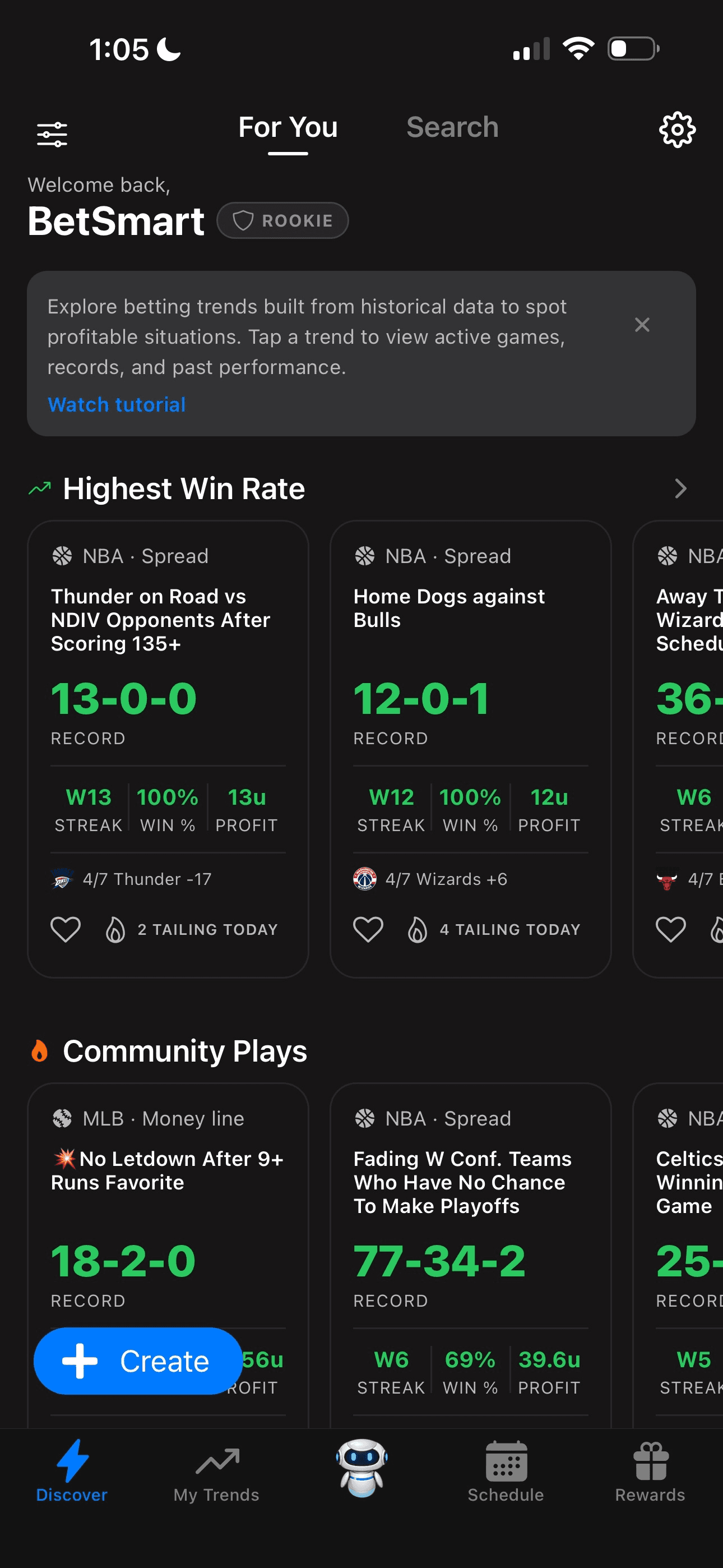
The For You page is the first thing you see when you open the app, and it is fully customizable. You can sort by sport, by the strongest trends of the day, or by systems you have already saved. Filters are drag and drop, which makes it easy to reshape the view depending on what you are looking for. If you only care about NFL and NBA on a given night, you can hide everything else in seconds.
Verified Trends and 30+ Year Systems
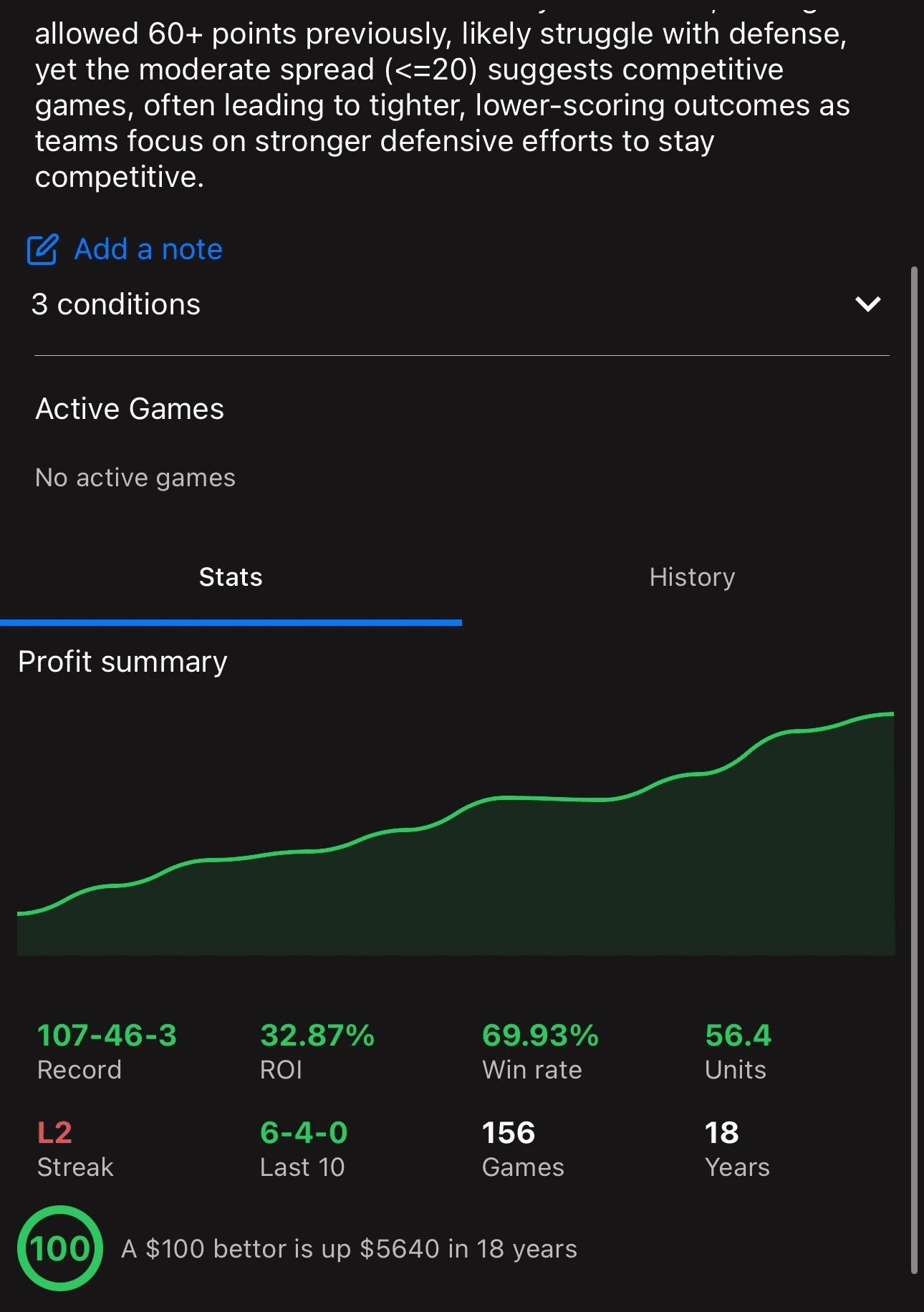
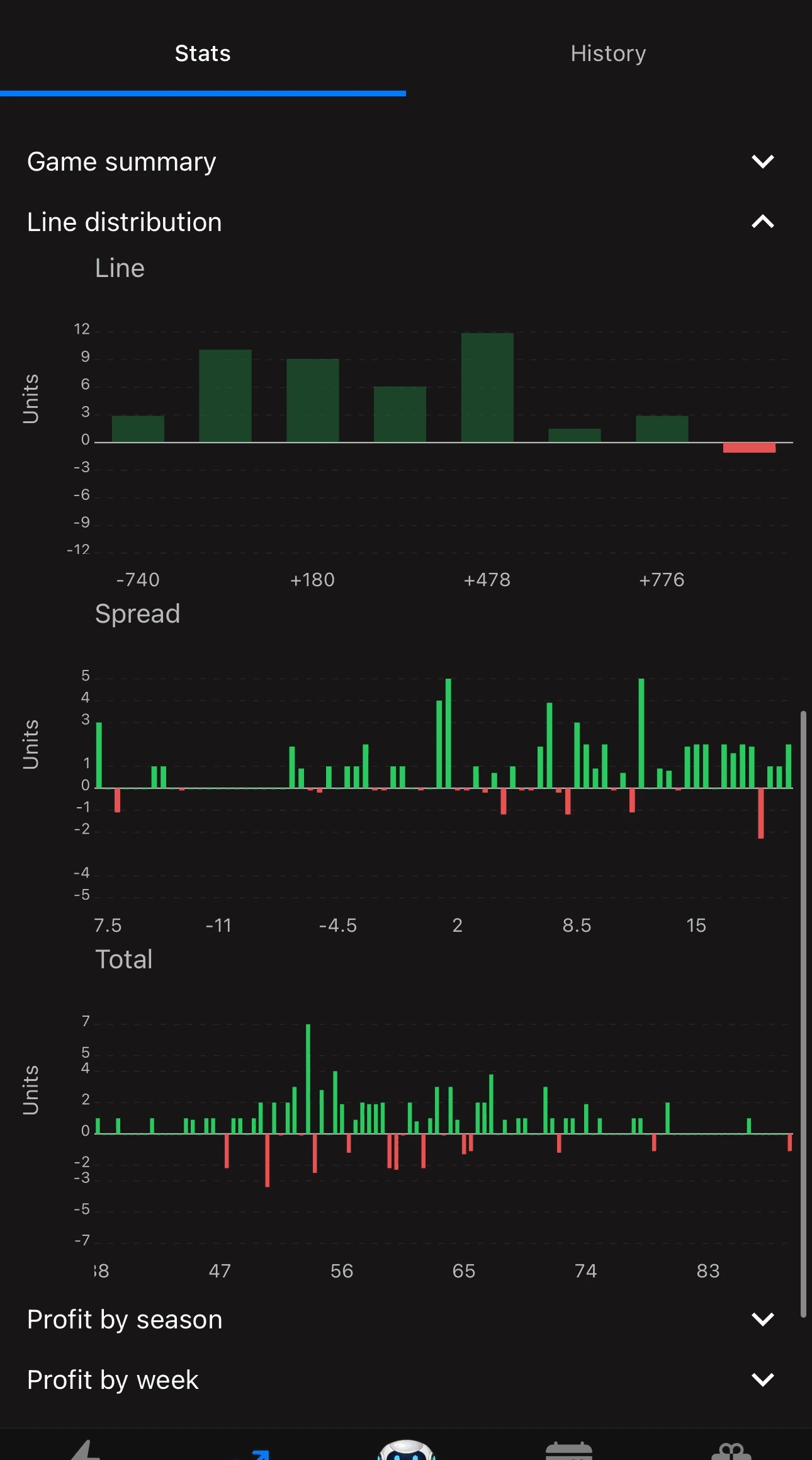
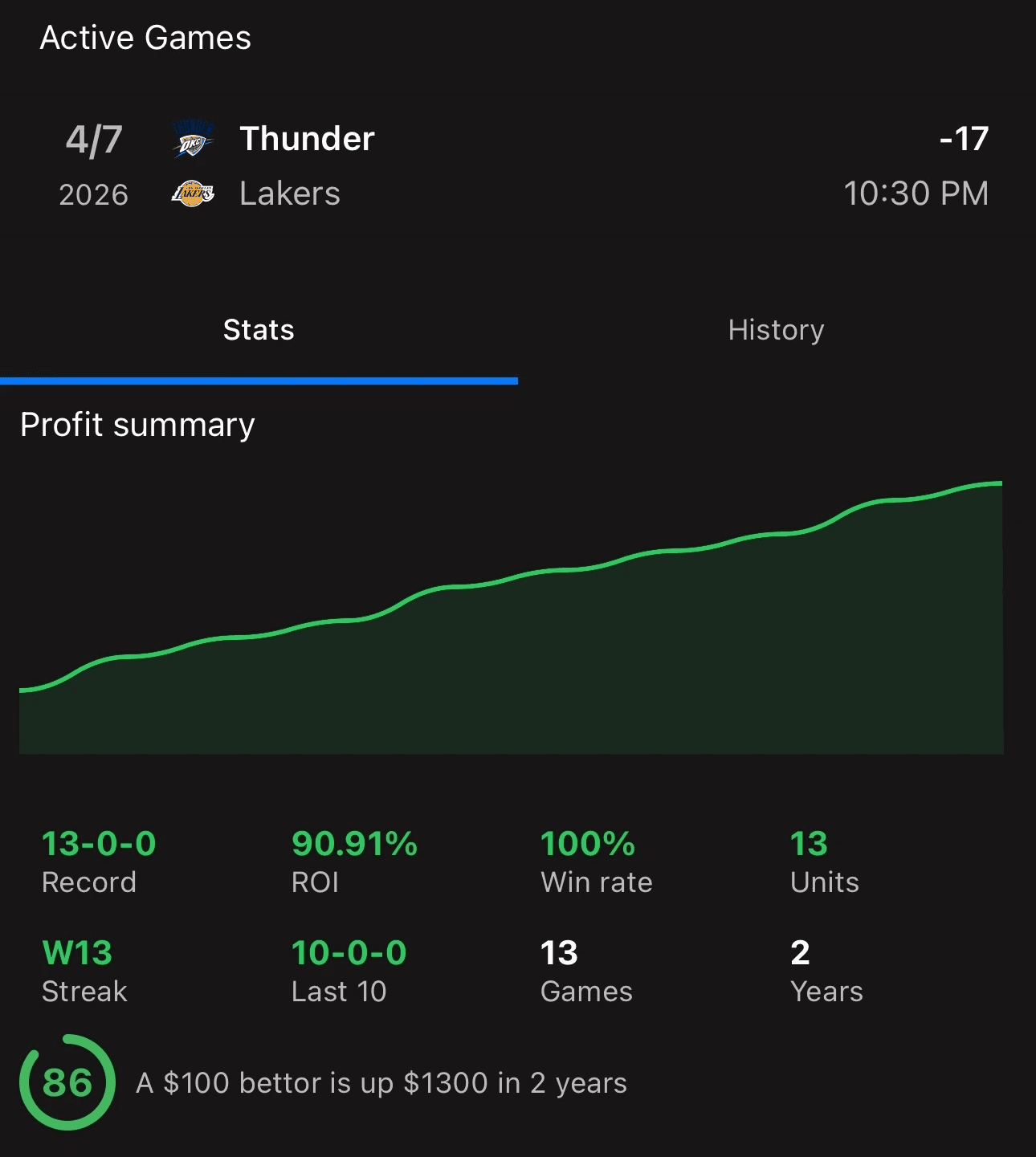
TrendsCenter's verified trends are systems the team has manually approved as long-term profitable. These are surfaced most prominently in the feed, and they are backed by decades of data, with some going back more than 30 years. You can see the profit curve over time, the total units gained, and how the system has performed recently versus its long-term baseline. This is where the value of a trends tool actually lives. Any bettor can check whether overs are hitting this week, but running a multi-decade back test with built-in recency weighting is a different exercise entirely.
Per-Sport Trend Search
Each sport has its own search hub with tabs for all trends, today's action, and upcoming matchups. Inside NFL, you can jump straight to today's games and see which verified systems apply, or browse upcoming matchups later in the week. The layout is consistent across sports, so once you learn the NBA view, the MLB and NFL ones behave the same way.
Create Your Own Trends
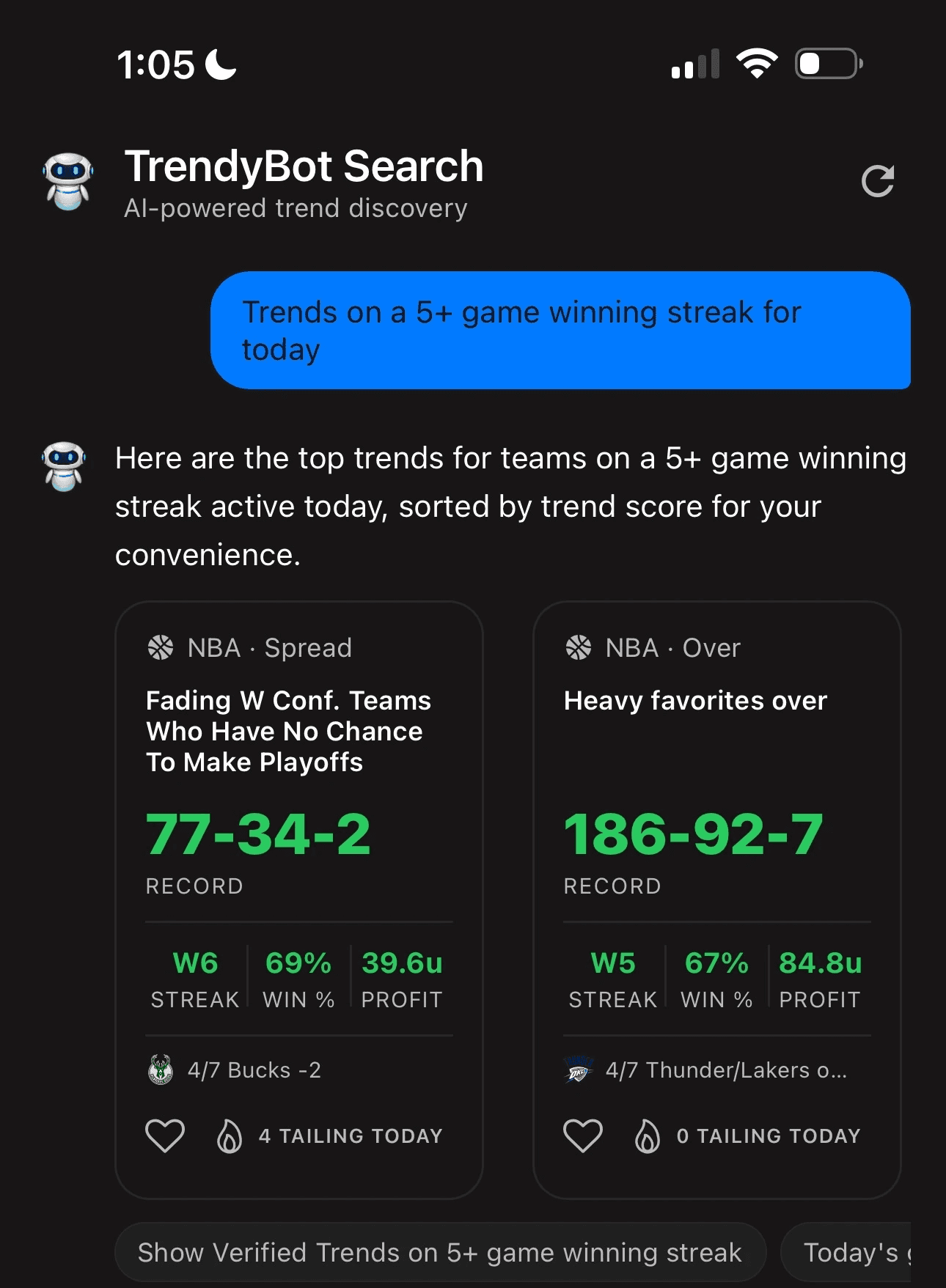
Custom trend building is where TrendsCenter is at its strongest. You can pick any sport, market, and filter combination you want. I ran a filter for NBA spreads on road favorites coming off a five-game losing streak, and within seconds the app returned the full historical record, unit profit, win rate, and any active games on tonight's board that matched the system. You can save the filter, get notified when future games hit it, and share it with other users who can tail it. TrendyBot, the Premium plain-language search, does the same job without the filter menus. Ask it for something like "NFL trends on a 5+ game winning streak" and it returns matching systems with their records and profitability attached.
Trend Rating Out of 100
Every trend and system gets a rating out of 100 based on sample size, ROI, recent performance, and overall profit. The score does not predict the next result, but it is a reasonable shortcut for separating trends with statistical weight from ones that look strong on a small sample. It is one of the more thoughtful scoring systems I have seen on a trends tool because it does not reward a 70% win rate when the sample is tiny.
Line Shopping and Team Split Data
TrendsCenter hits sportsbook APIs in real time to pull odds and team splits for the active games on your slate. You can line shop across the major books for the trend bet you want to make, and the team split data gives you a secondary layer of context on top of the historical trend. It is not a full odds comparison tool at the level of a dedicated line shopping app, but it gives you enough to avoid leaving obvious value on the table.
Saved Trends, Portfolio, and Notifications
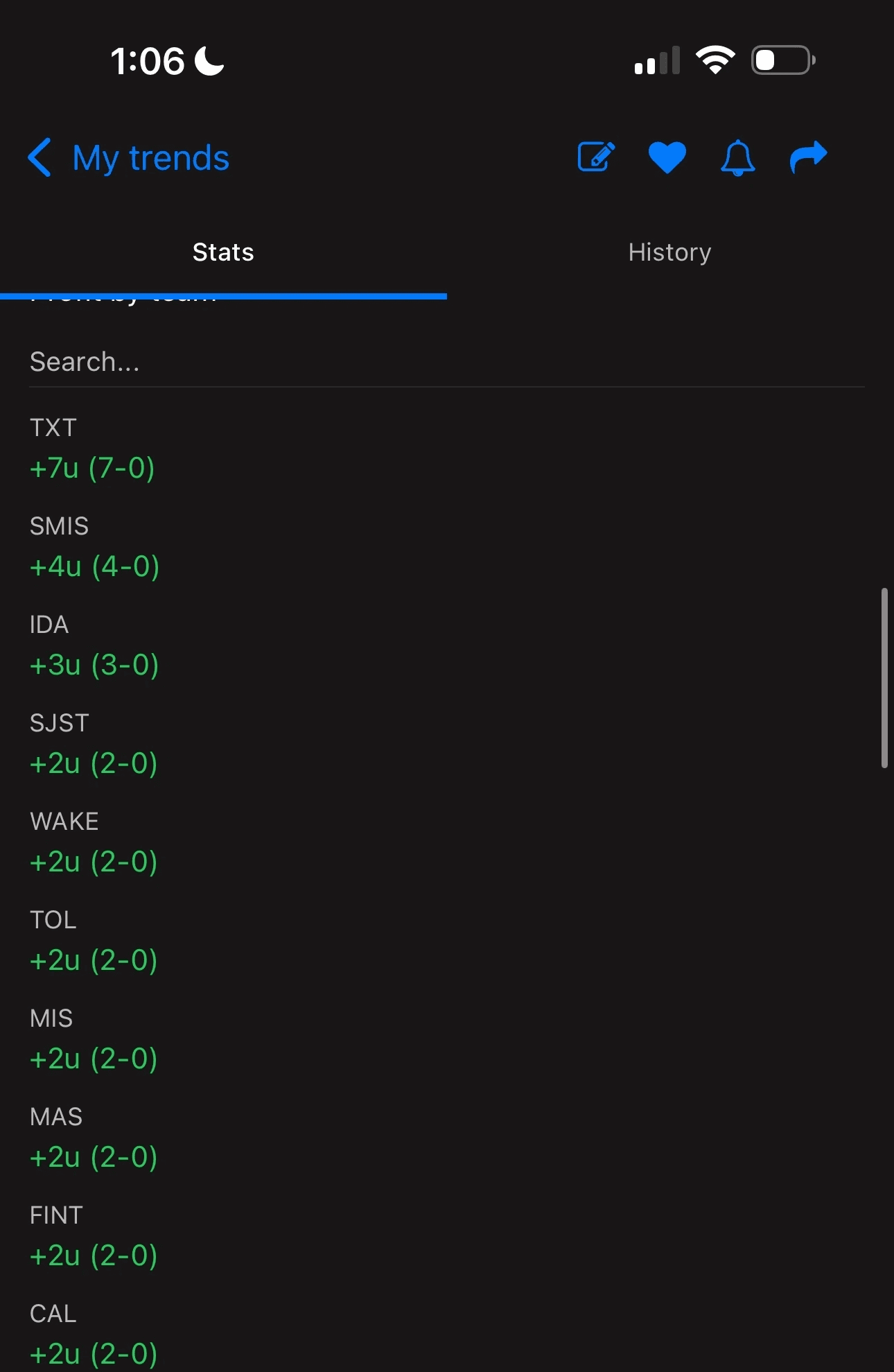
The My Trends section is where your saved filters and verified trends live, and the portfolio builder lays the trends you follow out on a daily calendar with ROI tracked day by day and month by month, so you can see whether a system is actually holding up. Push notifications alert you whenever a saved filter matches an active game, which is useful for situational bets that only pop up a handful of times per season. The July release put trends on home screen widgets and Siri shortcuts, so you can check a system without opening the app.
TrendsCenter Pricing and Plans
TrendsCenter has a free tier and one Premium membership billed monthly or annually. Both Premium cycles unlock the same features, so the only real decision is how long you plan to use it.
Free: browse trends, run a limited number of back tests, and see the free pick of the day. That is enough to judge the filter workflow before you pay anything.
Premium monthly: $27.99 per month. The better fit if you only want coverage for part of a season or want to run it through a few slates first.
Premium annual: $199.99 per year, or roughly $16.67 per month. Twelve months on the monthly plan runs $335.88, so the annual plan saves about $136 if you plan to run systems from football season into basketball.
Premium unlocks unlimited back tests, verified systems, TrendyBot, and daily picks, and it opens with a 3-day free trial. Code BETSMART takes 15% off recurring charges, which brings the monthly plan to about $23.79 and the annual plan to about $170, or close to $14 per month. For comparison, OddsJam runs $199.99 per month, so a full year of TrendsCenter with the BETSMART code costs less than one month of a premium +EV scanner. That gap is the main reason a narrower tool can still earn a line item in your stack.
Billing runs through the Apple App Store or Google Play, so you manage or cancel from your device subscription settings. There is no separate billing portal to deal with.
TrendsCenter Promo Code & Free Trial
TrendsCenter runs both. Premium opens with a 3-day free trial, and entering the code BETSMART at checkout takes 15% off your recurring charges once the trial converts. That puts the monthly plan at around $23.79 and the annual plan at around $170, which is close to $14 per month across a full season. The discount applies to whichever billing cycle you pick.
There is also a free tier sitting underneath the trial. You can browse trends, run a limited number of back tests, and see the free pick of the day without paying anything, which is a fair way to decide whether the filter workflow fits how you research before the trial clock even starts. Billing runs through Apple or Google, so you cancel from your device subscription settings if it is not for you. You can download TrendsCenter and apply the code inside the app.
Why TrendsCenter Stands Out
TrendsCenter does not try to be an EV scanner or a projection model. It puts its effort into trend and system research, and a few specific things separate it from the other trend tools I have spent time with.
Built for Custom System Building
Most trend data on free sites is surface level. You get splits like "home dogs are 52% this year" and that is about it. TrendsCenter pushes past that by letting you build filters on top of filters. Stack road favorites, a rest disadvantage, and a spread between 3 and 7 points, and you see in seconds how that narrower group has performed over 30+ years, not the broad split everyone else is quoting. You do not need to know SQL or touch a spreadsheet to get there, which is what makes it practical for bettors who want situational angles without learning to code.
Verified Trends Filter the Noise
Anyone can generate a trend. The hard part is knowing which trends have enough signal to matter. TrendsCenter's verified trends layer is where the team hand-picks systems that have held up over decades of samples, and the out-of-100 rating does more filtering by weighting sample size and ROI together. Instead of scrolling through a wall of cherry-picked 68% hit rates, you start with the systems that have actually stood the test of time.
Community Plays and Content Feed
The app has a social layer where you can tail trends other users save, plus an in-app content feed with YouTube videos, blog posts, and newsletter content from the team. Deep links to sportsbooks are on the roadmap, which will close the loop on tailing once they ship.
Rewards Program
TrendsCenter runs a tiered rewards program where the longer you use the app, the more points and perks you unlock. You move up tiers, pick up discounts, and earn badges along the way. For a subscription you are paying every month anyway, it is a nice retention layer that most competitors do not bother with.
Where TrendsCenter Can Improve
Most of TrendsCenter's gaps come from its narrow focus. None of them are dealbreakers, but each one shapes what else you need in your stack.
Limited Feature Depth Outside Trends
TrendsCenter is strong at what it specializes in, but the feature set outside trend building is thin. There is no dedicated +EV scanner, no arbitrage tool, and no prop projection model. The portfolio builder narrows the gap on tracking, since it charts ROI on the systems you follow, but it is not a full bet tracker that logs every wager and closing line. There is also no browser version anymore, so if you do your research on a work laptop that is not an Apple Silicon Mac, you are doing it on your phone. Plan on pairing it with a second tool that covers the rest of your workflow.
Basic Trends Are Not Edge on Their Own
This is more of a user education point than a product flaw, but it matters. Basic trends like home underdog moneylines or dome game overs are priced in by the market. The bettors who get the most out of TrendsCenter use it to build layered, situational systems, not to fire off the verified trends tab without additional context. Adding more onboarding around how to think about trend data versus edge would help newer users.
Deep Linking Still Coming
The community tailing feature is social for now, and the team has said deep linking to sportsbooks is on the roadmap. Once that ships, going from a saved trend to an active bet will be much faster. For now you are still doing a manual handoff to your sportsbook app.
What's New at TrendsCenter (August 2026)
Version 14.0.3, August 2026: Saved trends now display their own results, so you can see how a system you tracked actually performed without rebuilding the back test from scratch.
Version 14.0.0, July 31, 2026: TrendsCenter added home screen widgets and Siri shortcuts, putting saved systems and the day's trends one glance away instead of one app launch away.
Portfolio builder: Added in a recent release, it lays the trends you follow out on a daily calendar and tracks ROI day by day and month by month instead of leaving saved systems scattered.
Recommended Platforms to Use TrendsCenter
Since TrendsCenter pulls live odds and team splits directly from sportsbook APIs, the books you pair it with matter. Recreational sportsbooks with deep market coverage are the natural pairing for trend-based betting, since you are rarely flagged as sharp and you get the strongest promos to fund your action.
FanDuel: Deep prop and alt line markets that pair well with situational trend bets.
ProphetX: A CFTC-regulated prediction market where you trade sports contracts peer to peer, so winning traders are not limited the way they are at a sportsbook. Sign up through our link and code BETSMART applies automatically. Read our ProphetX overview.
BetMGM: Solid live odds and a clean interface for placing bets once your saved trends fire.



Is TrendsCenter Legit?
Yes, TrendsCenter is a legitimate betting research app. It is published by Trends Center LLC and distributed through the Apple App Store and Google Play, so it passes both platforms' app review, and billing runs through Apple or Google. The App Store listing carries a 4.7 rating across more than 310 ratings, and the team ships maintenance releases steadily, with the app on version 14.1.10 as of October 2026. You can manage or cancel a subscription directly from your device settings without chasing a separate billing portal.
The trust signals go beyond distribution. Verified trends are hand-checked by the team and backed by profit curves going back more than 30 years, and the out-of-100 rating weights sample size and ROI so a small hot streak does not masquerade as a system. The honest caveat is that a trend describes what has already happened rather than what will happen next, and deep linking to sportsbooks is still on the roadmap, so you place bets manually for now.
Is TrendsCenter Worth It?
TrendsCenter is worth it if you are a situational bettor who wants to build and back test your own systems, or if you want verified trend data layered on top of a strategy you already run. You can find out before any money moves: back test on the free tier, then use the 3-day Premium trial to run your systems against a full weekend slate. Watch how often your saved systems fire during the trial. If they hit a game or two a week, the monthly plan for football season may be all you need. If they fire most nights across NFL, NBA, and NHL, the annual plan at close to $14 per month with BETSMART is the cheaper route. It fits best next to a +EV or line shopping app, and it is one of the more targeted options on our best sports betting tools list.
It is probably not the right fit if you are new to betting and expect the app to hand you winners, or if you want one subscription that covers every part of the process. TrendsCenter rewards bettors who treat a trend as one input and still check the price before they bet. If that is how you bet, start the TrendsCenter free trial and enter code BETSMART at checkout for 15% off.
Final Thoughts
TrendsCenter earns its place for bettors who enjoy building angles and running structured trend research instead of tailing a picks feed. Just make sure the trend supports the price rather than substituting for it.